MediMio Learning Platform
Designing an accessible, engaging learning platform for elementary school students and teachers where education meets intuitive digital experiences.
Project Overview
MediaMio is a concept for a digital learning platform designed for elementary education. The goal was to design an intuitive environment where students learn through play, while teachers can easily create, manage, and personalize learning materials.
The platform addresses two main user groups:
Elementary students (ages 6–10) who need a visually engaging, simple, and motivating interface.
Teachers who require efficient tools to organize lessons, track progress, and provide differentiated learning support.
This case study represents a self-initiated UX project, focused on research, structure, and design. This is not a live implementation.
The Challenge
Dual User Groups
Creating a unified experience for both students and teachers with vastly different needs, goals, and digital skill levels.
Balancing Engagement & Usability
Making learning visually engaging without overwhelming users or distracting from educational goals.
Scalable Design for Education
Building a foundation that can grow from basic learning activities to advanced material management tools.
Research & Discovery
Research Approach
As this was a solo UX project, research was conducted through a combination of desk research and a nationwide educator survey in Germany. The goal was to understand the digital challenges in elementary education from both institutional and classroom perspectives.
Data & Reports Review
I collected national statistics and educational studies highlighting the increasing digitalization gap in German primary schools, from limited digital literacy to uneven access to learning technology.
Nationwide Teacher Survey
To gain qualitative insight, I reached out to 10 elementary schools across all 16 German states, gathering responses from teachers on their experiences with digital learning tools.
Defining Core User Groups
-
Based on these insights, I structured the user research around two personas:
- Mia (Student Persona): curious, easily distracted, needs visual feedback and playful learning.
- Sabine (Teacher Persona): structured, time-constrained, values clarity, efficiency, and control.
Design Solutions
Teacher Dashboard
A clear, well-organized workspace where teachers can create and manage assignments (optionally with AI assistance), track student progress and completion and access and share materials across subjects and grade levels.
Student Dashboard
A gamified, motivating space for children featuring colorful cards for tasks and achievements, simple navigation with large touch targets as well as visual progress indicators to foster self-motivation.
AI-Supported Material Creation
Teachers can generate new learning materials with AI, adjust difficulty levels, and personalize content per class or student group.
Simplicity & Structure
Every element was designed with cognitive load in mind: minimal text, clear icons, and structured layouts that support quick recognition and exploration.
Design Process
Information Architecture & Wireframing
Created low-fidelity wireframes for both teacher and student journeys to define content hierarchy and navigation.
Component Library
Built a foundational design system with reusable components: cards, navigation, progress bars, and color-coded categories for subjects and grade levels.
Mid- to High-Fidelity Prototypes
Iterated on visual design in Figma, focusing on accessibility for young readers and consistency across devices (web & tablet).
Interface Refinement
Simplified layouts to ensure the platform feels friendly and intuitive, even without formal onboarding.
Key Features
Note: MediaMio is a concept project developed for portfolio purposes. The listed features represent core UX and interaction design goals rather than a live implementation.
Student Learning Hub
- Gamified learning experience that motivates through XP points, badges, and collectible avatars.
- Three learning modes (Missions, Adventure, and Level Training): offering structured, free, and progressive learning paths.
- Simple and playful navigation, designed for early learners with large icons and clear visual hierarchy.
- Visual progress feedback (stars, levels, and medals) to keep motivation high and learning goals visible.
- Concentration mode (Pomodoro-inspired) to help children focus during short learning sessions.
Teacher Dashboard
- Assign learning missions to individual students or entire classes.
- Track progress and completion rates through a clear and intuitive overview.
- AI-assisted material creation that helps teachers quickly generate or adapt learning resources.
- Integrated communication hub (Messenger) connecting teachers, students, and parents.
- Access to shared material database, filterable by subject, grade level, and creator.
Interactive Learning Modules
- Mini-games, quizzes, and storytelling exercises that make abstract topics tangible.
- Adaptive challenge levels: exercises can become more complex as learners advance.
- Immediate feedback on exercises
- Instant feedback system so students immediately understand mistakes and can improve.
- XP-based reward system linking learning progress with avatar and badge unlocks.
System & Usability
- Responsive design for both web and tablet use in classrooms.
- Consistent component library across teacher and student environments.
- High contrast mode
- Child-friendly color palette ensuring clarity and engagement without overstimulation.
- Privacy-conscious architecture: no data collection beyond in-class use.
Project Visuals
From early wireframes to final designs
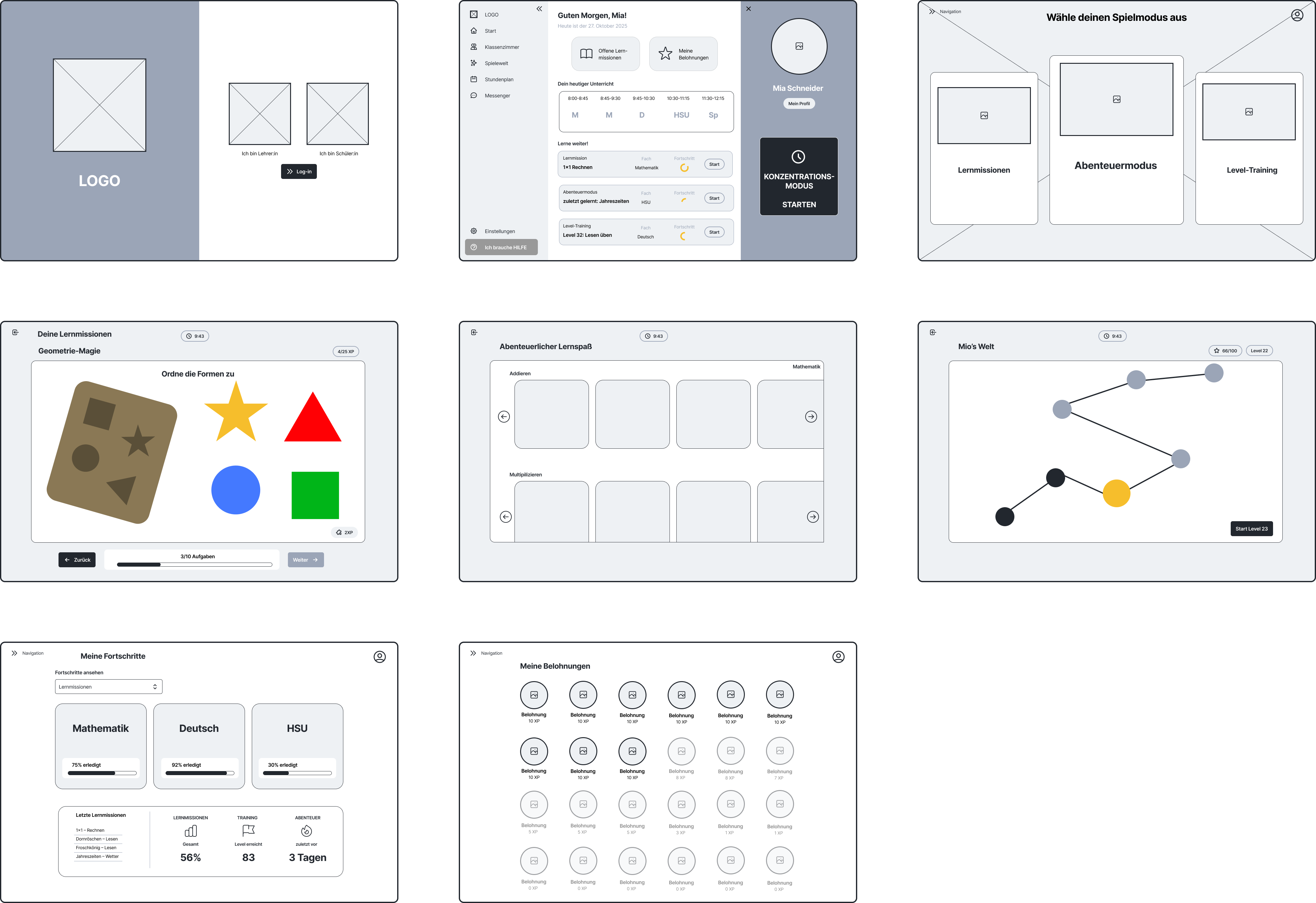
Low-Fidelity Wireframe: Student Dashboard
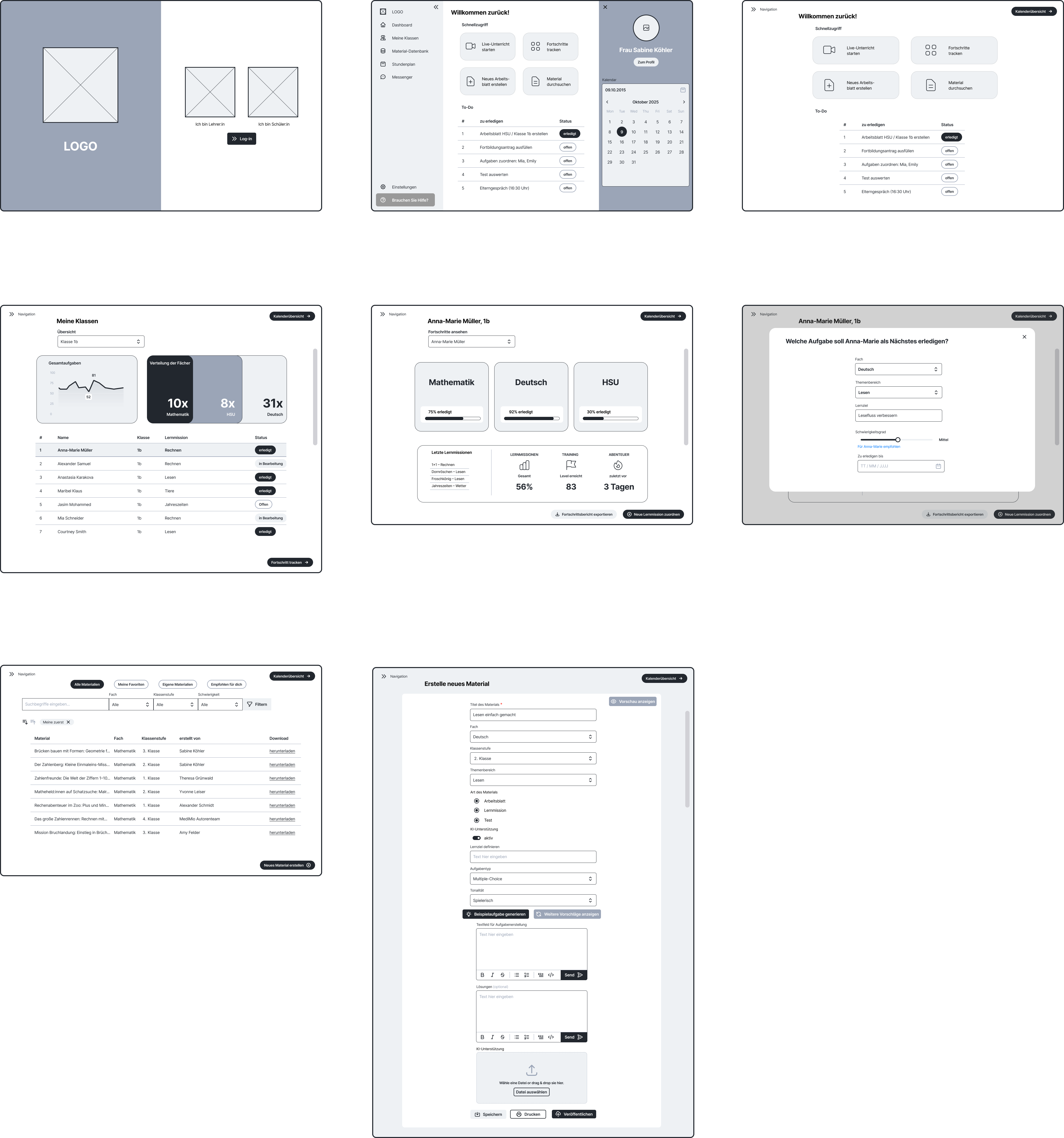
Low-Fidelity Wireframe: Teacher Dashboard
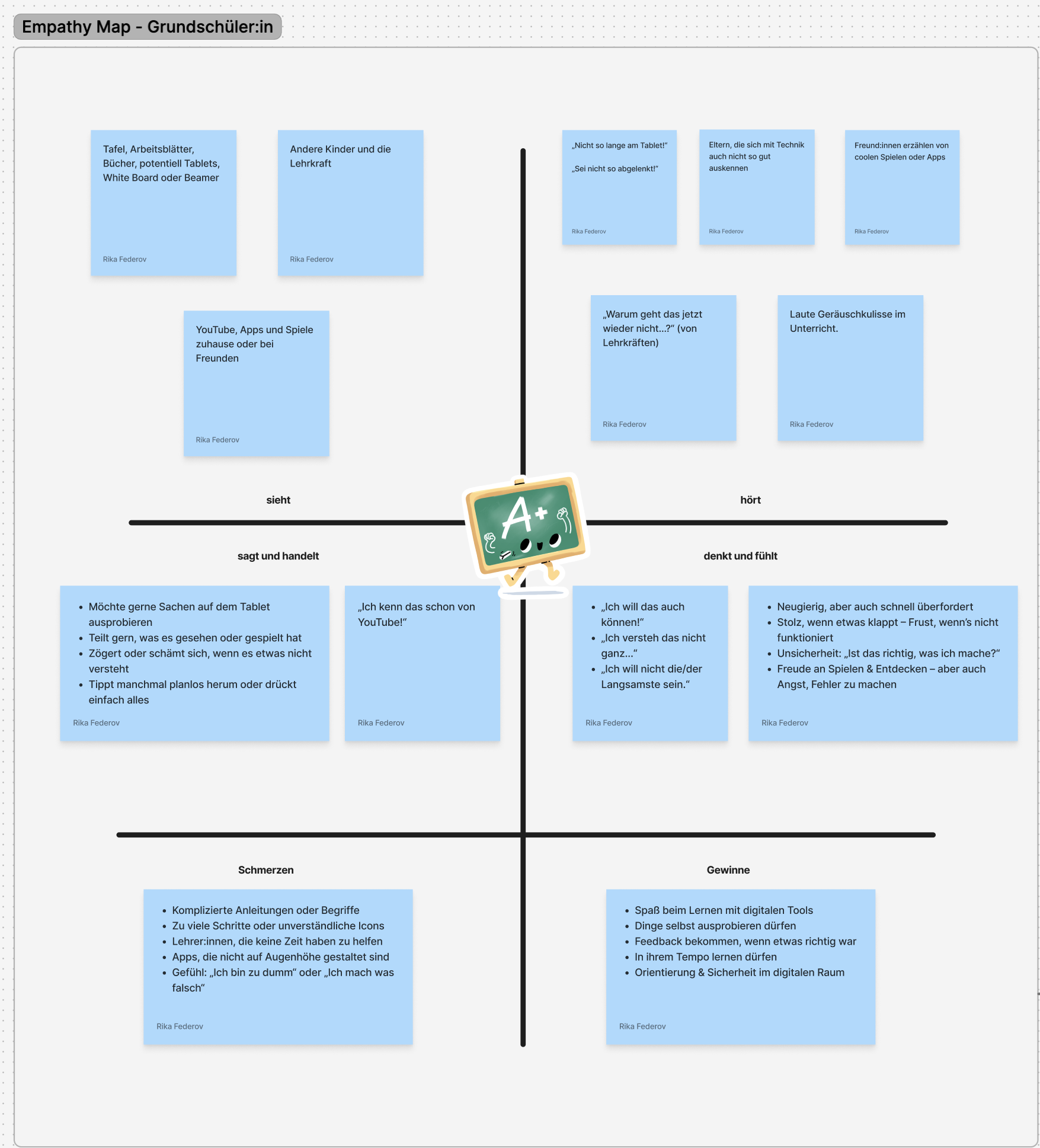
Empathy Map - UX Research
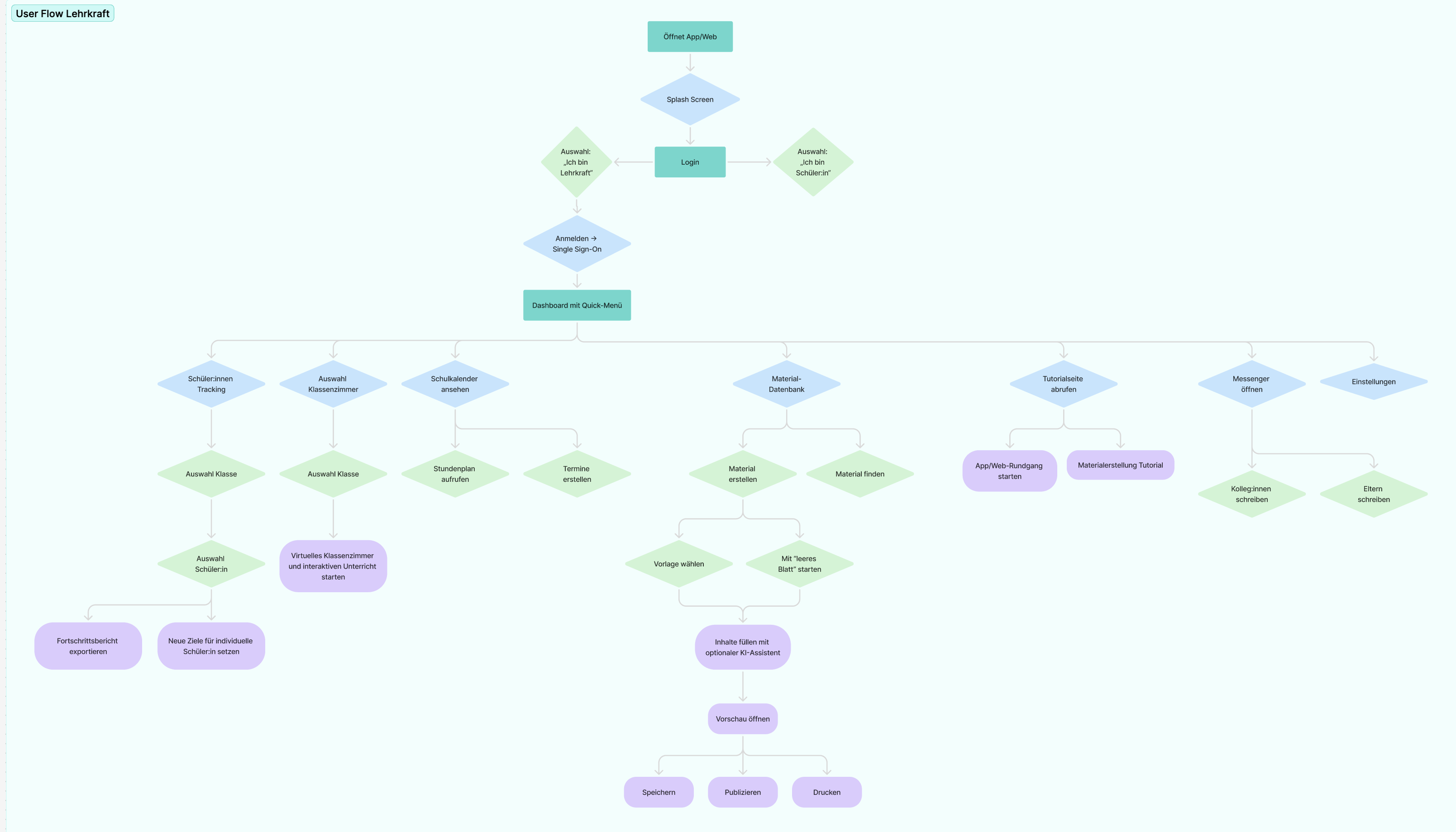
User Flow Diagram
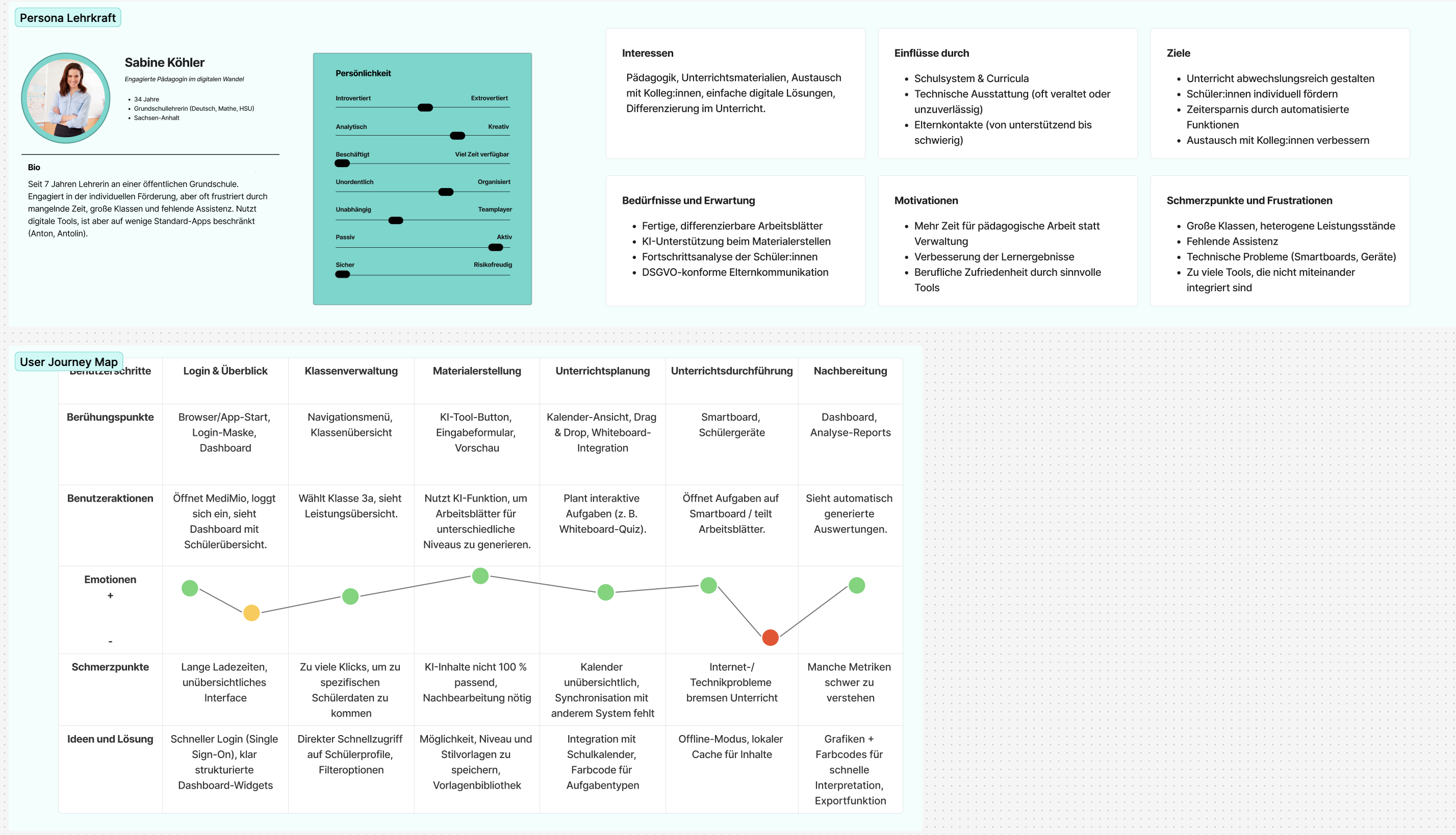
Persona - UX Research
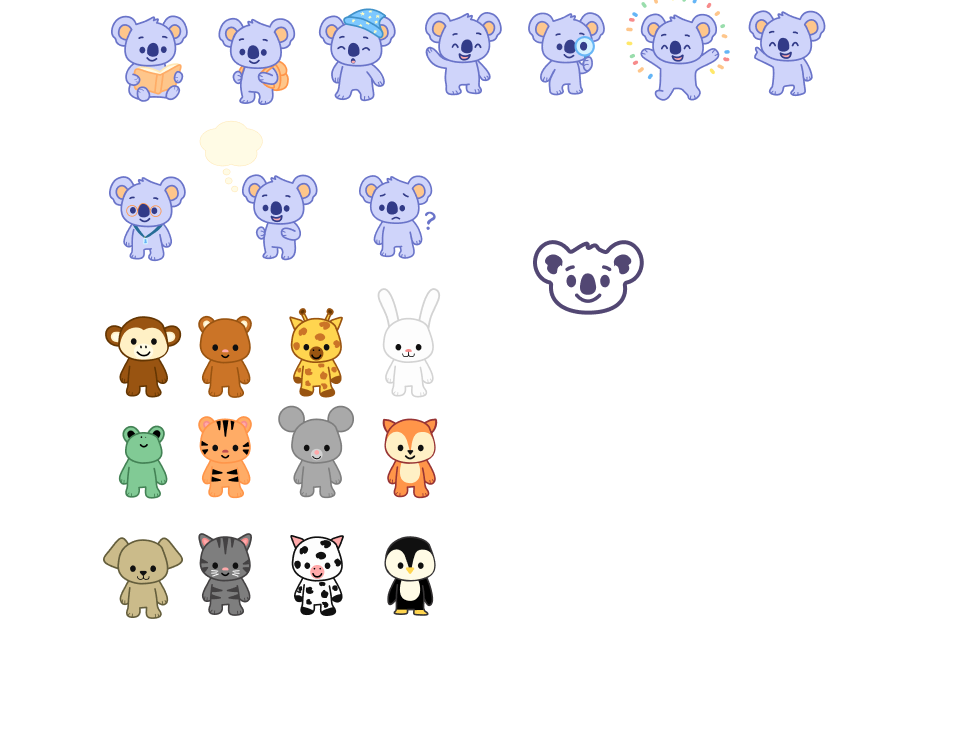
MediMio Illustrations
← Swipe to see more →
Impact & Results
As this is a conceptual UX project, there were no live metrics or usability tests with real classrooms. However, through the design process, several important outcomes emerged:
Key Learnings
Realistic Research Is Still Valuable
Even without field studies, structured desk research and educator surveys can yield deep insights when contextualized carefully.
Dual-User Systems Demand Flexibility
Designing for two user groups simultaneously forces clarity in hierarchy, navigation, and content strategy.
Simplicity Drives Engagement
Especially in primary education interfaces, the less cognitive friction, the greater the learning focus. Visual clarity beats feature overload every time.
Interested in Working Together?
I'd love to bring this level of user-centered design thinking to your next project.
Get in Touch